Accept Solana Payments in an Afternoon: Merchant & Developer Playbook
Map Solana's Payment Button, Solana Pay, and Direct RPC to merchant order mapping, validation, and settlement. Go live fast or use CryptoPayr for hosted...
CryptoPayrSep 13, 202613.00 min read
Accept Solana Payments in an Afternoon: Merchant & Developer Playbook
For quick web checkout, drop in the PaymentButton component and go live in an afternoon. For POS or mobile, build a Solana Pay link or QR code instead. Only reach for direct RPC integration when you need full control over reconciliation. Whichever path you pick, test on devnet first and verify every transaction server-side before you ship an order.
TL;DR:
Using the PaymentButton allows merchants to implement a checkout in less than an hour but requires backend verification of signatures before order fulfillment.
Solana Pay QR codes are ideal for point-of-sale or mobile checkouts, with transaction confirmation relying on polling for reference and transfer validation.
Direct RPC integration offers the most control, suitable for high-volume reconciliation, but demands managing pre-provisioned wallets and handling transaction polling and deduplication.
Always publish the root wallet address instead of a derived token account to avoid misrouted payments, and perform both findReference and validateTransfer steps to prevent shipping goods on incorrect payments.
CryptoPayr simplifies integration by offering hosted gateways, payment links, and plugins that handle wallet provisioning, polling, and reconciliation, saving merchant development time.
Cryptopayr
cryptopayr.com
Add Crypto Payments Without Complexity
CryptoPayr helps e-commerce, SaaS, and digital businesses accept over 110 cryptocurrencies through hosted gateways, payment links, and plugins.
How to Choose the Right Way to Accept Solana Payments
Solana gives merchants three distinct paths to accept payments, and picking the wrong one wastes engineering time you don’t get back. The official Solana documentation splits them by complexity: Payment Button (low), Solana Pay (medium), and Direct RPC (high).
Payment Button is a prebuilt React component. It handles wallet connection, token selection, and the checkout UI, so a solo developer can wire it into a Next.js storefront in an hour.
Solana Pay generates a URL or QR code that any Solana wallet app can scan or open. It fits point-of-sale counters, mobile checkouts, and any situation where the payer isn’t sitting at your website.
Direct RPC integration means you talk to the Solana network yourself, no middleware component. It’s the right call for marketplaces splitting commissions, treasury systems moving large volumes, or any platform with reconciliation needs a standard component can’t cover.
Run through this before you write a line of code:
How fast do you need to launch? Payment Button wins on speed.
Do you control the checkout screen, or is this a physical counter? Solana Pay fits POS and mobile.
Do you need custom order matching across hundreds of daily transactions? That’s Direct RPC territory.
How much backend capacity do you have for building and maintaining verification logic?
Payment Button Quickstart: What It Handles and What Your Backend Must Do
The PaymentButton component needs Node.js 20 or later and a React or Next.js project. Drop it into a page, pass it a config and paymentConfig prop, and it renders a working checkout button without you touching wallet adapters or transaction builders.
Here’s what the component takes care of on its own, versus what lands on your server:
Wallet connection and token selection happen entirely inside the component. The shopper connects Phantom, Solflare, or another supported wallet, picks a token, and approves the transaction.
Transaction processing runs client side, and the component fires onPaymentSuccess once the payer signs and the transaction submits, returning a signature you can verify.
Order fulfillment stays your job. Your backend must take that signature, confirm it on chain, match it to the right order, and only then mark the order paid.
The component’s mode prop (buyNow, cart, tip) lets you reuse one component across different checkout flows instead of building three separate UIs.
Pro Tip:Test everything on devnet first, and set a fallbackSolPriceUsd so your checkout doesn’t break if a price feed goes down mid transaction. That single fallback value has saved more launches than any amount of error handling.
Never mark an order fulfilled purely because onPaymentSuccess fired. Confirm the signature against the chain before your backend touches inventory.
How Do You Build a Solana Pay QR Checkout?
Solana Pay uses a standard URL scheme for both native SOL and SPL token transfers, and it’s already an approved integration on Shopify for merchants who want instant settlement straight to a wallet. Building one takes four concrete steps.
Construct the transfer request URL. Encode the recipient wallet address, the amount, a unique reference key, an optional label, and a memo. If you’re accepting USDC or another SPL token, add the token mint address to the request.
Turn the URL into a QR code or clickable link. Show the QR at a physical counter or embed the link in a web or mobile checkout page. Either format opens directly in the payer’s wallet app.
Poll for the transaction with findReference. Once the payer approves in their wallet, your backend searches for a transaction referencing that unique key, according to the Solana Pay merchant integration guide.
Confirm with validateTransfer before you fulfill anything.findReference only proves a transaction exists that mentions your reference. It says nothing about whether the amount, token, or recipient are correct, which is exactly why QuickNode’s Solana Pay guide treats the pairing of the two functions as mandatory, not optional.
Finality is a real design choice, not a footnote. Use finalized for high-value fulfillments where a reversal would hurt. For smaller purchases, confirmed gets you a faster yes, as long as you reconcile the finalized state later.
Pro Tip:Never fulfill an order on a findReference hit alone. Merchants have shipped goods against a transaction that referenced the right order but paid the wrong amount, because they skipped the validateTransfer step.
If you’re already handling payment link patterns for invoicing, the logic overlaps closely with reusable crypto payment links.
Direct RPC and Production Reconciliation: Building for Scale
Reading raw transactions off the chain via RPC gives you data that indexing providers sometimes strip out. Indexing services can omit memo and reference fields on inbound transfers, which breaks any reconciliation logic that depends on those fields being present.
That’s why Solana’s platform payments documentation recommends provisioning a fresh custody wallet for every order instead. The destination address itself becomes the correlation key. No memo parsing, no reference matching, no dependency on a third party’s indexing choices.
A production worker built around this pattern needs:
A pool of pre-provisioned wallets, warmed ahead of checkout, so a shopper never waits on wallet creation.
Polling logic that checks balances or recent transactions against each assigned wallet.
Dedupe logic keyed by transaction signature, so a retried poll never double credits an order.
A finality setting matched to order value, finalized for anything expensive, confirmed if speed matters more and you reconcile afterward.
A fallback path for reading full transaction details via RPC when an indexer’s response is missing fields you need.
Solana’s fee structure makes this kind of infrastructure cheap to run at scale. Transactions typically cost a fraction of a cent and confirm in around 400 milliseconds under normal network conditions, a margin that lets a merchant run thousands of polling checks a day without the infrastructure cost becoming its own line item.
Security, Settlement, and a Merchant Checklist
Start with USDC or another high-liquidity stablecoin if price volatility worries you more than blockchain fees. It settles at the same speed as SOL, and your accounting team will thank you for the predictable numbers.
One caveat trips up almost every new integration: receiving SPL tokens requires a token account, and creating one costs a small amount of SOL for rent-exempt storage. Budget for that up front, especially if you’re provisioning wallets programmatically.
Before you flip the switch on live payments, run through this:
Publish your root wallet address as the receiving address, never a derived token account.
Decide whether you auto-convert incoming crypto to stablecoins, hold it as is, or route it through a gateway for fiat payouts.
Never expose a private key to a browser or client app. Signing happens in the payer’s wallet, and your backend should only ever handle public addresses and signatures.
Handling Transaction Failures and Retries
Failed transactions on Solana usually fall into one of three buckets: the payer’s wallet times out before confirmation, the network drops the transaction under load, or your polling logic checks too early and misses a transaction that lands a few seconds later.
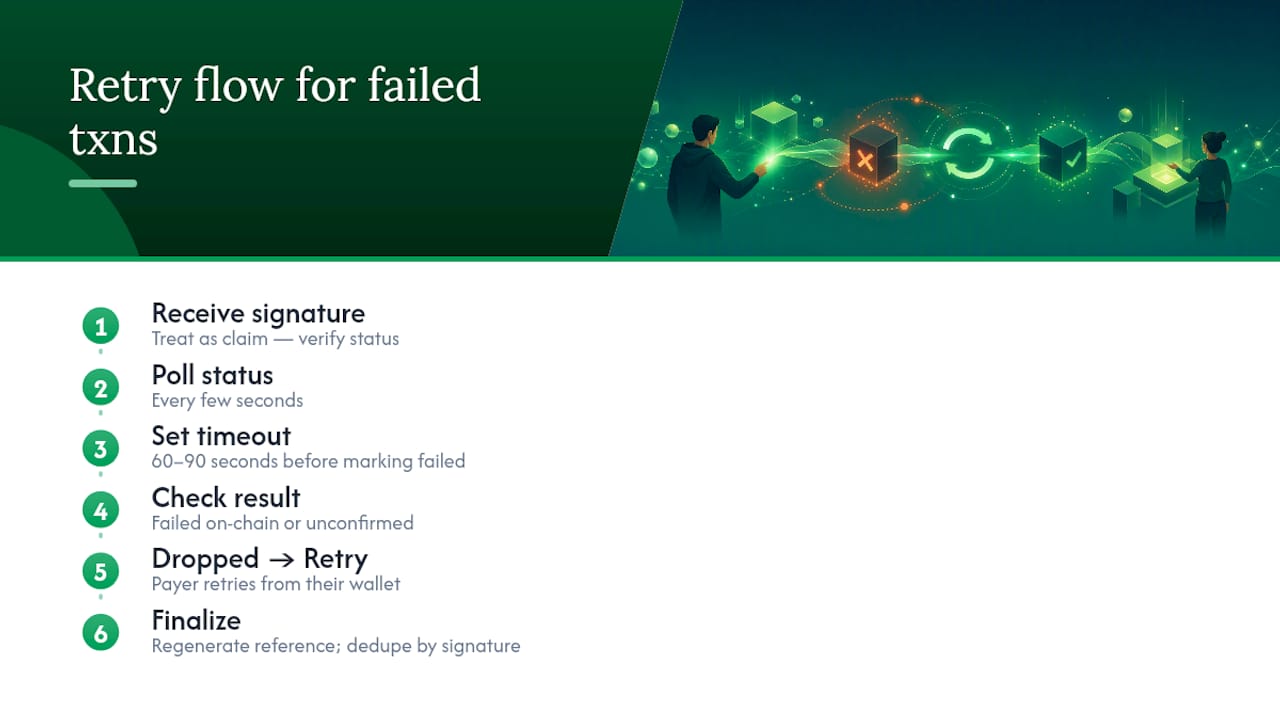
Build your retry logic around the transaction signature, not the order ID. When onPaymentSuccess returns a signature, treat it as a claim you have to verify, not a confirmed payment. Poll for that signature’s status on an interval, generally every few seconds, and set a reasonable timeout window (60 to 90 seconds covers most normal conditions) before you tell the customer something went wrong.
Distinguish between a transaction that failed on chain and one that simply hasn’t confirmed yet. A dropped transaction needs the payer to try again from their wallet. A slow-confirming one just needs patience and a working polling loop.
For the direct RPC and per-order-wallet approach, dedupe by signature is non-negotiable. Network retries and duplicate webhook deliveries from an indexing provider can otherwise credit the same payment twice against an order.
If a payment genuinely fails, give the payer a clear retry path: regenerate the Solana Pay QR code or payment link with a fresh reference rather than reusing the old one. Reusing a reference on a retry makes it harder to tell which attempt actually succeeded once your findReference call runs.
How Should You Notify Customers About Payment Status?
Crypto payers expect faster feedback than card payers, because they’re watching their own wallet app confirm the transaction in real time. Your checkout UI needs to match that pace or the customer starts wondering if something broke.
Show a clear pending state the moment the wallet interaction starts, not after your backend confirms anything. Once onPaymentSuccess fires or findReference gets a hit, move to a “confirming” state rather than jumping straight to “paid.” That middle state matters more than it looks, because it’s the gap where validateTransfer runs and where a mismatched amount would surface.
Only show a final confirmation once your server has validated the transfer against the expected recipient, asset, and amount. Send an email or in-app notification at that point, not before. A premature “payment received” message that later has to be walked back over a validation failure destroys trust faster than a slightly slower checkout does.
For POS and mobile flows using Solana Pay, a visible countdown or spinner tied to the polling interval keeps the customer from wondering whether the QR scan actually registered. People assume a QR code failed if nothing happens within a few seconds, even when the transaction is confirming normally in the background.
Integrating Solana Into Existing E-Commerce Platforms
Most merchants aren’t building checkout from scratch. They’re bolting Solana onto Shopify, WooCommerce, OpenCart, or a custom cart that already runs card payments.
Solana Pay’s approved status on Shopify means merchants on that platform can add a QR-based checkout option without touching their existing payment stack. For platforms without native support, a gateway that ships prebuilt plugins closes the gap faster than writing your own PaymentButton wrapper against every cart system you run. CryptoPayr, for instance, offers direct plugins for platforms like OpenCart and Easy Digital Downloads, which handle the checkout UI and settlement logic so you’re not reimplementing findReference and validateTransfer for every cart you support.
If you’re running a custom platform, the API route still makes sense. Hosted checkout pages and payment links reduce the surface area you have to secure and test compared to building a Direct RPC integration in-house. For merchants who want to accept a stablecoin like USDC alongside SOL without managing separate token account logic, a dedicated USDC acceptance flow handles the token account creation step automatically.
Practical Implementation Tips From the Field
The single biggest mistake I see: merchants publish a derived token account as their receiving address instead of the root wallet, and payments silently misroute. Publish the root address, always.
Second most common failure: teams call findReference and stop, skipping validateTransfer entirely. That gap has cost real merchants real inventory. If you have the engineering time, provision per-order wallets. If not, combine both functions on every single transaction, no exceptions.
— Dustin
Why CryptoPayr Handles the Parts You’d Rather Not Build
Every workflow above works. It also means someone on your team owns wallet provisioning, RPC polling, finality tuning, and fiat conversion, indefinitely. CryptoPayr exists for merchants who’d rather spend that engineering time on their actual product.
CryptoPayr runs a no-KYC gateway that accepts Solana alongside more than 110 other cryptocurrencies, including Bitcoin and Ethereum, with fees starting at just 0.1%, well below what most card processors charge before you even touch crypto infrastructure. You can use hosted checkout, payment links, an API, and e-commerce plugins without writing a findReference loop or managing a warm pool of custody wallets yourself.
Pick CryptoPayr over self-hosting when you want fiat settlement handled for you, when your team doesn’t have spare hours for reconciliation logic, or when you want Solana acceptance live this week instead of next quarter. If broader coin support matters too, the full acceptance page covers all supported assets in one integration.
Set up your gateway account and get a checkout link running in minutes.
E-commerce stores, SaaS platforms, gaming server operators, and physical retailers using POS QR flows all accept Solana, either through direct integration or a hosted gateway like CryptoPayr.
What Wallets Support Solana Payments?
Phantom, Solflare, and other wallets compatible with the Solana Pay standard all work with both the PaymentButton component and Solana Pay QR codes.
How Do You Cash Out Solana to a Bank Account?
You either auto-convert incoming SOL to a stablecoin and route it through an exchange, or use a gateway that handles fiat payouts directly, which shifts most compliance and conversion work off your plate.
What Is a Solana Payment, Exactly?
A Solana payment is a blockchain transaction sending SOL or an SPL token like USDC from a payer’s wallet to a merchant’s wallet, confirmed by the network in roughly 400 milliseconds under normal conditions.
Which Integration Should a New Merchant Start With?
Start with PaymentButton for a standard web checkout, or Solana Pay if you need QR support for POS or mobile. Reserve Direct RPC integration for platforms with custom reconciliation needs.