Use USDC and Reserved Lanes to Accept Optimism Payments for Merchants
The fastest way to accept Optimism payments is to turn on Optimism and USDC support inside a crypto payment gateway you already use, or to sign up with one that supports it, then run a test transaction on the Optimism testnet before going live. Optimism’s reserved lanes and predictable low fees make it a solid fit for merchants who need reliable checkout speed. Enable it, test it, launch it.
TL;DR:
- Using USDC on Optimism is recommended for stability and liquidity, minimizing the risk of exchange rate fluctuations during settlement.
- Merchants should start with hosted checkout or plugin integrations to go live quickly, switching to API control only when business needs justify it.
- Optimism’s network design offers fast, low-cost confirmations through reserved lanes and relayer patterns, especially benefiting high-frequency small transactions.
- Settlement in USDC simplifies accounting and refund policies, with options to auto-convert to fiat or hold stablecoins based on preference and jurisdiction.
- Testing on the Optimism testnet is essential to prevent launch issues, focusing on webhook reliability, transaction edge cases, and network load simulation.
Cryptopayr
Add Optimism Payments To Your Business
Cryptopayr helps e-commerce, SaaS, gaming, and digital businesses accept over 110 cryptocurrencies through existing platforms.
Table of Contents
What You Need Before You Integrate Optimism Payments
Rushing an integration usually means redoing it two weeks later. Before you write a line of code or click “connect wallet” on a gateway dashboard, settle five decisions.
Pick your settlement asset first. Most merchants should start with USDC on Optimism rather than ETH or a volatile token. USDC’s liquidity and price stability mean you’re not gambling on exchange rates between the moment a customer pays and the moment you convert to cash, and Stripe’s guidance on crypto acceptance points to the same logic: a single high-liquidity stablecoin keeps bookkeeping simple.
Decide how deep you want to integrate. A hosted checkout page needs almost no engineering. An API integration gives you control over checkout UX but requires a developer. Direct wallet acceptance means you manage private keys yourself.
Line up your technical prerequisites:
- API keys or gateway account credentials
- Webhook endpoints for payment confirmation events
- Order IDs and idempotency keys to prevent duplicate processing
- Access to the Optimism testnet for a dry run before real money touches your checkout
Set your accounting and refund policy in advance. Will refunds go out in the same stablecoin the customer paid with, or as a fiat-equivalent value? Will you hold crypto or convert it automatically at payout?
Check your KYC exposure. Some gateways require full business verification and identity documents before you can accept a single payment, which can stall a launch for weeks. Cryptopayr’s no-KYC integration option is built for merchants who want to skip that onboarding queue entirely.
Choosing Your Integration Path: Checkout, Plugin, API, or Wallet
Four paths lead to accepting Optimism payments, and they trade off engineering time against control.
- Hosted checkout or pay links. You generate a link or embed a checkout button, the customer pays, and the gateway handles the blockchain mechanics. This is the fastest option for a market stall, a one-page storefront, or a service business invoicing clients directly. Setup usually takes under an hour.
- E-commerce plugins. If you run Shopify, WooCommerce, or OpenCart, a plugin connects your storefront’s checkout flow to the gateway with a handful of configuration fields. Cryptopayr’s OpenCart integration guide walks through the exact steps, and the pattern is similar across other platforms: install, authenticate, map your currencies, test an order.
- API integration. This is the right call when you need custom checkout flows, recurring billing, or marketplace-style commission splits. You’ll build order creation, listen for webhook confirmations, generate one-time payment addresses, and handle idempotency so a network hiccup doesn’t double-charge a customer.
- Direct wallet acceptance. You publish a wallet address and manage everything yourself, including key custody, transaction monitoring, and reconciliation. It’s technically the simplest concept and operationally the hardest to run safely at any real volume.
Pro Tip: Start with hosted checkout even if you eventually want API-level control. It gets you live and collecting real customer data within days, and you can migrate to API integration later without losing momentum.
Most merchants should start with hosted checkout or a plugin. Move to API integration only when a specific business need, like subscriptions, actually demands it.
How Optimism’s Network Design Affects Your Payments
Optimism runs as an optimistic rollup, which means transactions get bundled and processed by a sequencer, then posted to Ethereum with a challenge window before they’re considered fully final. In practice, this gives merchants fast, cheap confirmations without the congestion and gas spikes that plague mainnet Ethereum checkout flows.
A few mechanics matter directly to your checkout experience:
- Reserved lanes. Optimism Payments offers merchant-class applications the option to use reserved priority lanes, which keep your checkout transactions from getting stuck behind unrelated network activity during peak load. This matters most for high-volume use cases like payroll or remittance-style payments.
- Fee payment models. You can let customers pay their own gas, absorb it yourself as a cost of doing business, or use a relayer pattern where customers pay entirely in USDC and never need to hold ETH at all.
- Bridging. Moving funds onto or off Optimism requires a bridge. The official Optimism bridge is the reference implementation, and it’s worth testing with small amounts before you move real settlement volume.
- Programmable compliance. Optimism’s OP Stack architecture allows compliance logic, like sanctions screening, to run closer to the protocol level rather than bolted onto your checkout as an afterthought.
Merchants processing frequent small transactions, think subscription billing or tip payments, benefit the most from the relayer/meta-transaction pattern, since it removes the single biggest friction point in crypto checkout: making a customer buy ETH just to pay you.
Settlement and Accounting: Keep It Boring on Purpose
Settlement decisions should optimize for predictability, not upside. Settling into USDC on Optimism gives you fast finality and a stable unit of account, which is exactly what your bookkeeper wants.
From there, you have a real choice: auto-convert to fiat at every payout, or hold the stablecoin balance and convert on your own schedule. Auto-conversion simplifies your books and removes any exposure to a de-pegging event, but it usually costs a small conversion fee each time. Holding stablecoin balances avoids that recurring fee but means you’re managing a crypto wallet as a treasury function, not just a payment pass-through.
For reconciliation, generate order-scoped payment addresses or unique memo codes per transaction, log every webhook event you receive, and use idempotency keys so a retried webhook never gets recorded as a second sale.
- Settle to USDC on Optimism by default
- Decide auto-convert vs. hold before your first live transaction, not after
- Match refunds to how the customer paid, same coin or fiat-equivalent value, and state the policy up front
- Talk to local counsel about tax and licensing treatment before scaling volume, since crypto revenue reporting rules vary by jurisdiction
Cryptopayr’s USDC acceptance page covers the specific settlement mechanics if stablecoin-first is your plan, which for most merchants, it should be.
Testing and Go-Live Checklist for Optimism Payments
Skipping testnet validation is the single most common cause of a botched crypto payment launch. Here’s the sequence to run before you flip the switch:
- Bridge test USDC onto the Optimism testnet and confirm your webhook fires correctly on a completed payment.
- Simulate every customer path you plan to support: wallet-direct payment, pay-in-stablecoin via relayer, and merchant-subsidized gas.
- Force edge cases: duplicate webhook delivery, partial payments, and a payment that times out mid-confirmation.
- If you’re using reserved lanes, simulate traffic load to confirm your checkout transactions actually get priority treatment.
- Once live, monitor confirmation times, settlement latency, and your failed-payment rate daily for the first two weeks.
That last step catches problems fast. A failed-payment rate that creeps up after launch usually points to a webhook timeout or a misconfigured idempotency key, not a network issue.
An Editorial Look at Optimism Payment Integration
Dustin has spent years watching merchants overbuild their first crypto integration. The instinct is to treat blockchain payments as a research project: study rollup theory, compare five gateways, write custom smart contract logic before processing a single dollar. Optimism Payments already solved most of the hard problems, reserved lanes, fee flexibility, relayer patterns, at the protocol level. Cryptopayr supports 110 or more cryptocurrencies with fees starting at 0.1% and a no-KYC path, which means the actual bottleneck for most merchants isn’t infrastructure. It’s decision paralysis.
The merchants who launch fastest treat the network’s built-in features as the product, not as something to reinvent. Reserved lanes and stablecoin-only fee flows already exist. Use them.
The conventional advice to “understand the rollup architecture deeply” before integrating is mostly wasted time for a merchant. You need to know that confirmations are fast and fees are cheap. Everything past that belongs to your gateway provider, not your to-do list.
— Dustin
Walking Through a Shopify or WooCommerce Integration
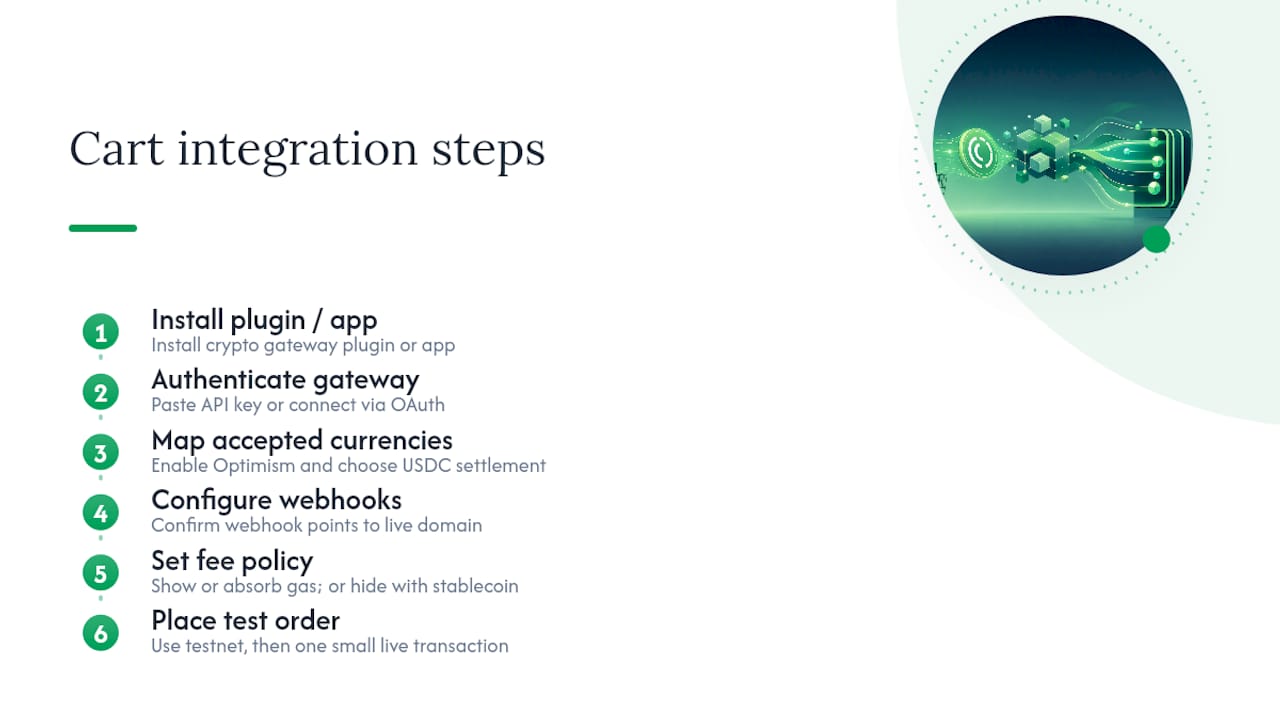
Platform integration follows a consistent pattern whether you’re on Shopify, WooCommerce, or a custom cart, and knowing that pattern in advance makes the actual setup feel almost anticlimactic.
Step 1: Install the plugin or connect the app. Search your platform’s app store for a crypto gateway extension, or install one directly from your provider’s dashboard credentials.
Step 2: Authenticate with your gateway account. You’ll paste in an API key or connect through OAuth, depending on the provider.
Step 3: Map your accepted currencies. Turn on Optimism and select USDC as your settlement asset. Most plugins let you toggle individual chains and tokens rather than accepting everything by default.
Step 4: Configure webhook URLs. Your storefront needs to know when a payment clears, so the plugin typically auto-generates this, but confirm it points to your live domain, not a staging environment.
Step 5: Set your fee policy. Decide whether the customer sees a gas fee line item, whether you absorb it, or whether you’re running a pay-in-stablecoin flow that hides gas entirely.
Step 6: Place a real test order. Use testnet funds first, then run one small live transaction before opening the floodgates. Cryptopayr’s OpenCart walkthrough documents this exact sequence for that platform, and the logic transfers almost unchanged to other carts.
Most merchants complete this entire sequence in under a day, plugin installation included.
Finality and Latency: What Optimistic Rollups Mean for Checkout
Optimistic rollups work on a fundamentally different assumption than a traditional payment rail. Transactions get batched by the sequencer and posted quickly, giving you a confirmation your customer sees within seconds, but full cryptographic finality on Ethereum’s base layer comes only after a challenge window closes, typically measured in days rather than seconds.
For checkout purposes, this distinction rarely matters. Once a transaction is included and confirmed on Optimism, reversing it would require an extraordinarily rare fraud-proof challenge to succeed, and no merchant treats that risk as material for standard retail transactions. Treat the sequencer confirmation as your operational green light: release the order, send the confirmation email, ship the product.
Where the challenge window actually matters is for large settlement transfers or bridging funds off Optimism to another chain. If you’re moving a large batch of accumulated revenue, building in awareness of that finality window, rather than assuming instant irreversibility the moment funds arrive, avoids a nasty surprise if you’re trying to immediately re-bridge a large sum. For day-to-day checkout, though, latency on Optimism is fast enough that customers rarely notice a difference from a card payment, and that’s the metric that actually matters for conversion rates.
Refunds and Chargebacks Without a Card Network
Crypto payments don’t have chargebacks in the traditional sense, and that cuts both ways for merchants. There’s no card network stepping in weeks later to claw back a disputed transaction, which eliminates a category of fraud entirely. But it also means the safety net customers expect from card payments simply doesn’t exist on-chain.
Refunds have to be a deliberate merchant policy, not a network feature. Decide upfront whether a refund returns the same amount of USDC the customer paid, or a fiat-equivalent value recalculated at refund time, and put that policy in writing on your checkout page. Because Optimism settlement is fast, processing a refund is usually a same-day operation, just send USDC back to the customer’s original address, or a new one they provide.
The harder problem is disputes where a customer claims non-delivery or a defective product. Since there’s no automatic reversal mechanism, your customer service policy has to fill that gap explicitly. Merchants who handle this well tend to hold a small stablecoin reserve specifically for dispute resolution, so a refund doesn’t require scrambling for liquidity. Build that reserve into your cashflow planning before volume grows, not after your first dispute lands.
What Fees Actually Look Like on Optimism
Optimism’s fee structure runs meaningfully lower than Ethereum mainnet, and that’s the entire reason it exists as a payment rail. A typical Optimism transaction costs a small fraction of a dollar in gas, compared to fees that can run into several dollars on congested mainnet periods.
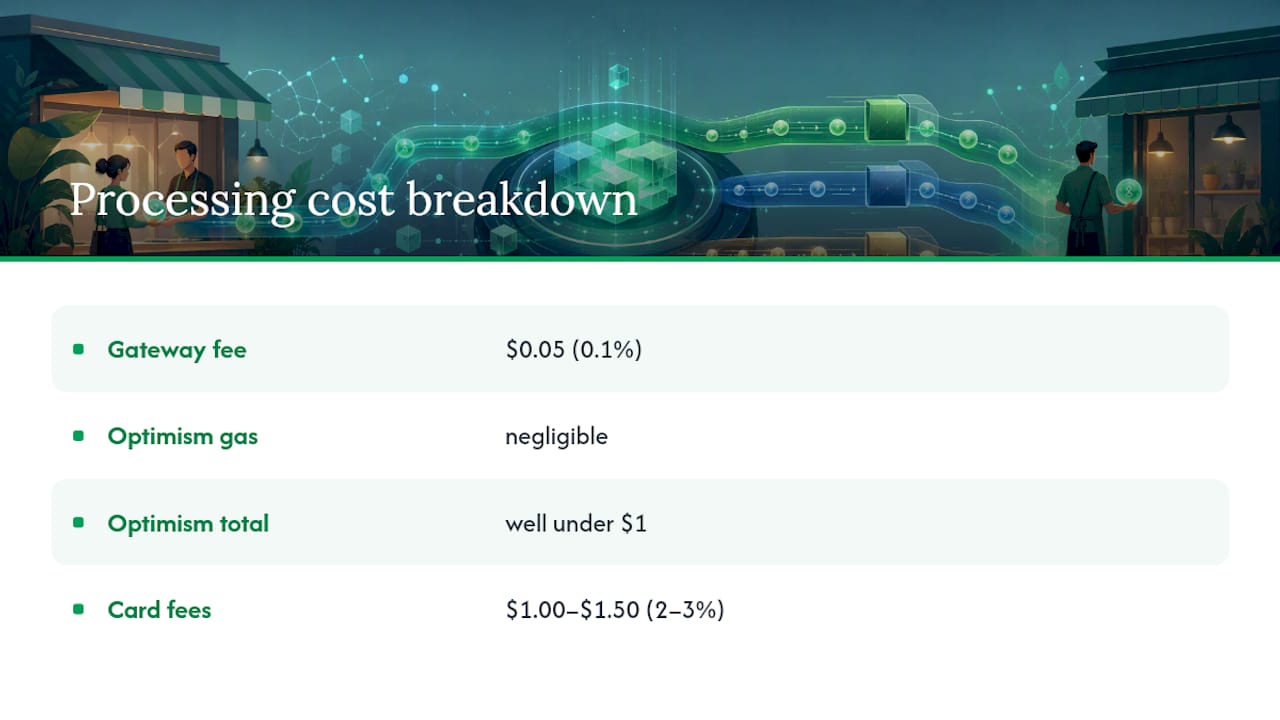
Layer that against your gateway’s processing fee, and the total cost stack for a merchant usually breaks into two pieces: the network gas fee (paid by whoever your fee model assigns it to) and the gateway’s percentage fee on the transaction value. Cryptopayr’s fees start at 0.1%, which sits well below typical card processing rates that commonly run in the 2 to 3% range once you account for interchange and processor markup.
The practical calculation for a merchant looks like this: take your average transaction value, add the gateway percentage fee, then add the network gas cost if you’re covering it rather than passing it to the customer. For a $50 order at a 0.1% gateway fee plus a negligible Optimism gas cost, your total processing cost lands well under a dollar, a fraction of what the same transaction would cost through a traditional card processor once chargebacks and interchange are factored in.
Absorbing gas yourself is usually worth it for conversion rate. Customers abandon checkout when they see an unfamiliar fee line item, even a small one.
Making Payment Feel Normal to the Customer
Customers paying in Optimism-based tokens hit friction at three predictable points, and each one is fixable with the right integration choice.
Wallet support. Not every customer has a wallet configured for Optimism specifically, even if they use crypto regularly on Ethereum mainnet. A checkout flow that auto-detects network and prompts a one-click network switch inside the wallet app removes most of this friction. Hosted checkout pages typically handle this automatically.
Confirmation timing. Customers expect near-instant feedback that their payment went through. Optimism’s fast sequencer confirmations mean you can show a “payment received” state within seconds, which matters enormously for cart abandonment. A confirmation screen that spins for thirty seconds convinces a customer something broke, even when it hasn’t.
Fee visibility. If a customer sees a separate gas fee added at checkout, expect some abandonment simply from unfamiliarity. Pay-in-stablecoin flows using a relayer pattern hide this complexity entirely; the customer sees one number, pays it, and never touches ETH.
Merchants who test their checkout flow with a genuinely non-technical customer, not a crypto-native colleague, catch these friction points fastest. What looks obvious to you as the merchant is often the exact moment a real customer closes the tab.
Get Started Accepting Optimism Payments
Everything above matters if you’re building a custom integration from scratch. If you’d rather skip the plugin configuration and webhook debugging, Cryptopayr gives you hosted checkout, pay links, and full API access for Optimism and USDC out of the box, with fees starting at 0.1% and no KYC paperwork slowing down your first transaction.
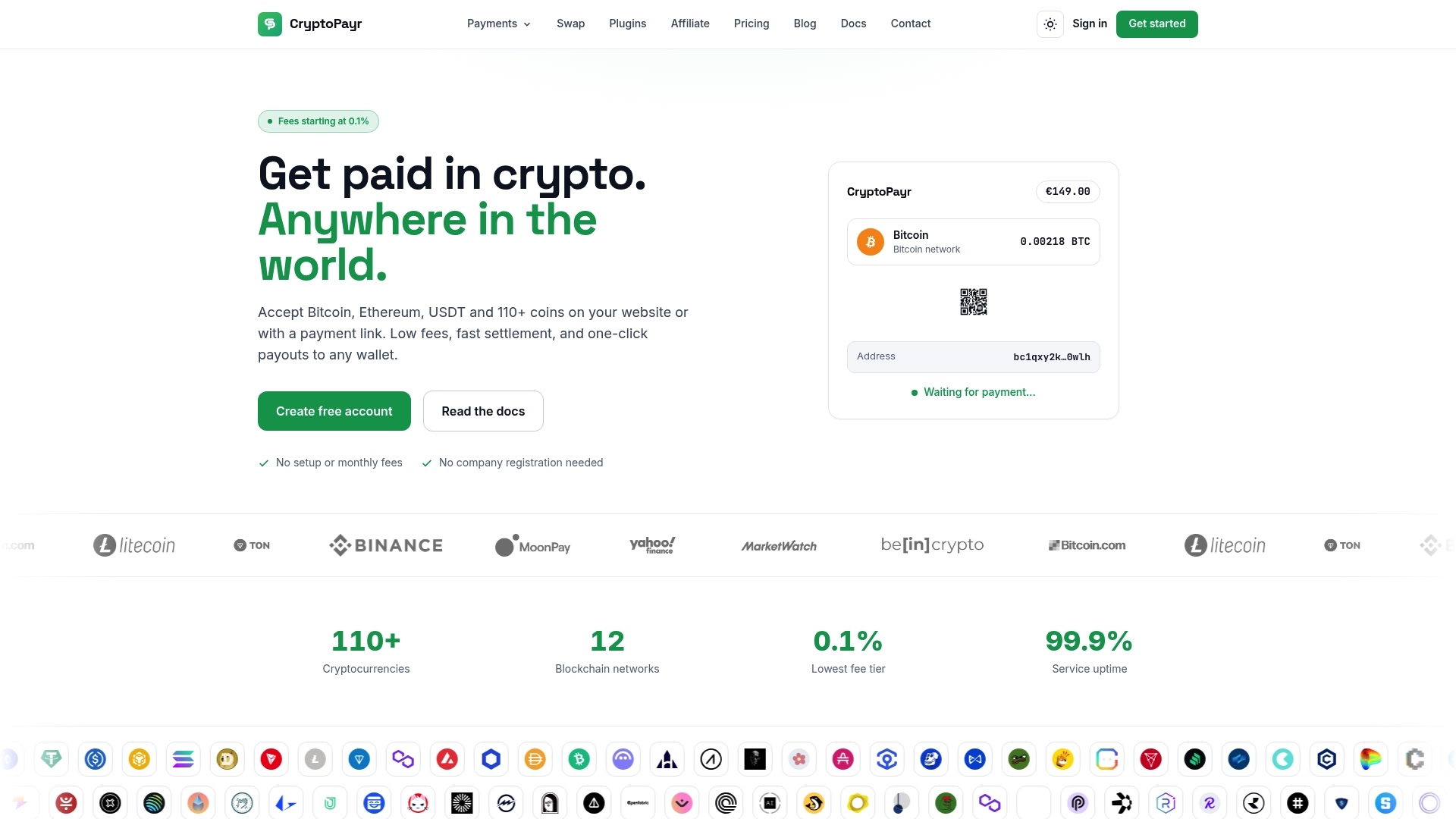
Most merchants get their first Optimism payment live the same day they sign up. Start with the Cryptopayr gateway if you want hosted checkout and API access without building anything from scratch, or check the USDC acceptance page if stablecoin-first settlement is your priority. Platforms that need their own branded checkout experience can look at the white-label option instead. Whichever path fits, the next move is the same: create an account, connect your storefront or generate a payment link, and run one test transaction before you open it up to customers.
Sources
FAQ
How Do I Accept Crypto Payments as a Small Business?
Sign up with a payment gateway that supports the tokens and chains you want, like Optimism and USDC, generate a hosted checkout link or install a plugin for your storefront, and test a transaction before going live. Cryptopayr’s no-KYC option lets most merchants complete this setup within a day.
Can I Accept Optimism Payments Without Writing Code?
Yes. Hosted checkout pages and pay links require no development work, just account setup and a link you share with customers or embed in an existing storefront.
How Do I Accept USDT Payments Alongside Optimism?
Most gateways that support Optimism and USDC also support other stablecoins like USDT, either on the same network or across multiple chains, configurable from the same dashboard without a separate integration.
Does Optimism Have a Future as a Payment Network?
Optimism’s OP Stack and Superchain architecture are designed for merchant-grade features like reserved lanes and programmable compliance, which suggests continued investment in payment use cases specifically, though no network’s long-term trajectory is guaranteed.
What Fees Should I Expect When Accepting Optimism Payments?
Network gas fees on Optimism typically run a small fraction of a dollar per transaction, and gateway processing fees vary by provider, with Cryptopayr starting at 0.1% per transaction.
Recommended


