Accept TRON Payments Without Coding for Merchants: Plugins Cover 90%
Accept TRON payments as a merchant: pick wallet, gateway, or hybrid; use plugins or hosted links; set confirmations, webhooks, and treasury rules.
CryptoPayrSep 15, 202610.00 min read
Accept TRON Payments Without Coding for Merchants: Plugins Cover 90%
Most online stores should accept TRON through a payment gateway that auto-converts TRX and USDT (TRC-20), since it handles confirmations, webhooks, and refunds without manual work. Merchants with a low number of B2B clients per month can skip the gateway and use a direct wallet address instead. Either way, the next move is the same: enable TRX in your gateway dashboard today, or generate a TRON wallet and publish its address as a QR code.
TL;DR:
Using a payment gateway for TRON simplifies automation, reduces manual confirmation and refund work, and offers real-time dashboards, especially for high-volume merchants.
Direct wallets eliminate gateway fees and provide full custody, but require manual payment matching, reconciliation, and refunds for low-volume, trusted B2B transactions.
Integration options include plugins for popular e-commerce platforms, hosted payment links for quick invoicing, and comprehensive API solutions for custom checkout flows.
Confirmations are recommended to scale with transaction size, generally 1-3 for small purchases and more for large invoices, supported by webhook updates and on-chain validation.
Merchants should clearly label accepted assets at checkout, manage funds separately for treasury and operations, and test transactions thoroughly before going live.
Cryptopayr
Accept Crypto Payments More Easily
CryptoPayr helps e-commerce and digital businesses accept over 110 cryptocurrencies through a user-friendly payment gateway.
Direct Wallet, Gateway, or Hybrid: Which Fits Your Store?
The three models split along one line: how much manual work you’re willing to trade for control.
A direct wallet means you generate a TRON address, hand it to the payer, and watch the blockchain yourself. You keep every fee and never expose a private key to anyone, since the payer only needs your public receiving address. But you’re on the hook for confirming payments, matching amounts to invoices, and issuing refunds by hand.
A payment gateway automates checkout widgets, webhooks, and currency conversion so the technical load disappears. You give up some margin to processing fees, but you gain a real-time dashboard and accounting exports that a solo merchant can’t build from scratch.
A hybrid setup splits the difference: gateway for storefront checkout, direct wallet for large infrequent invoices. High-volume merchants often land here because routing a six-figure B2B payment through a wallet avoids gateway fees that scale with transaction size.
Pick based on order volume and reconciliation tolerance:
High order count, low staff bandwidth: use a gateway. Automation beats manual tracking once you’re past a few payments a week.
Low-volume, high-trust B2B invoicing: a direct wallet keeps costs near zero and gives you full custody.
Mixed flow (storefront plus occasional large invoices): run both, and route by transaction size.
Refund handling changes with each model too. Gateways often support automated refund tools; wallet-based refunds require you to manually send TRX back and log the transaction hash yourself.
Plugins, Payment Links, or API: Picking Your Integration Path
Three technical routes get you live, and each suits a different kind of store.
Cart plugins work best if you’re running a common platform and want minimal custom code:
Install the plugin for your cart (OpenCart and Easy Digital Downloads both have dedicated crypto plugins, and WooCommerce merchants can follow a step-by-step integration guide).
Enable TRX and USDT (TRC-20) as accepted assets in the plugin settings.
Set your callback URL so the plugin knows where to send payment confirmations.
Run a full test checkout before flipping it live.
Public plugin code, including repositories maintained by gateway providers on GitHub, gives developers a working reference if you need to customize checkout behavior.
Hosted checkout and payment links suit merchants who want zero code. Generate a link per invoice, drop it into an email or text message, and the payer scans a QR code or clicks through to pay. This works well for service businesses, freelancers billing clients, and in-person sales where a printed QR code at the register replaces a card terminal.
API and SDK integration fits custom-built sites that need payment logic embedded directly into checkout flow. The basics:
Generate an API key from your gateway dashboard.
Set a webhook endpoint that listens for payment status updates.
Verify webhook signatures on every callback to confirm the request actually came from your gateway.
Build idempotency handling so a retried webhook doesn’t credit the same order twice.
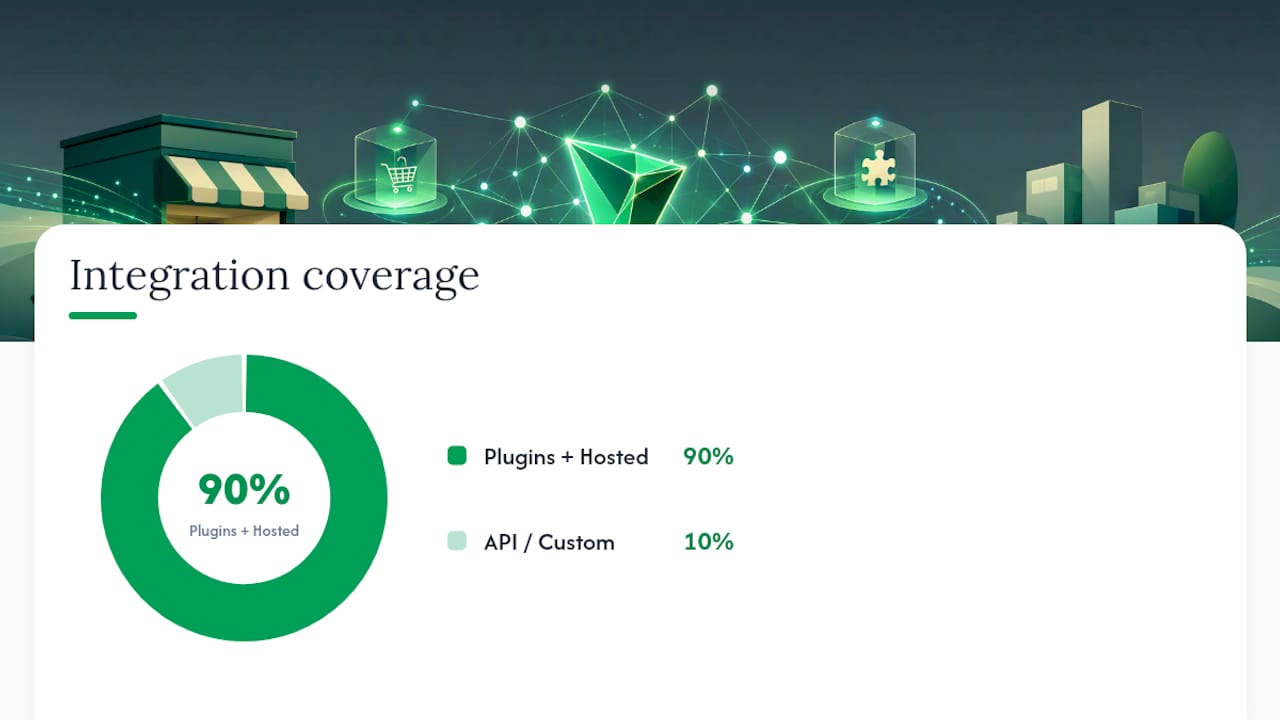
For most e-commerce platforms, plugins and hosted checkout cover 90% of use cases without touching a line of code.
How Do You Confirm a TRON Payment Is Final?
Confirmation depth is the number of blocks added to the chain after your transaction before you treat it as settled. More confirmations mean more certainty against double-spends, but also more waiting.
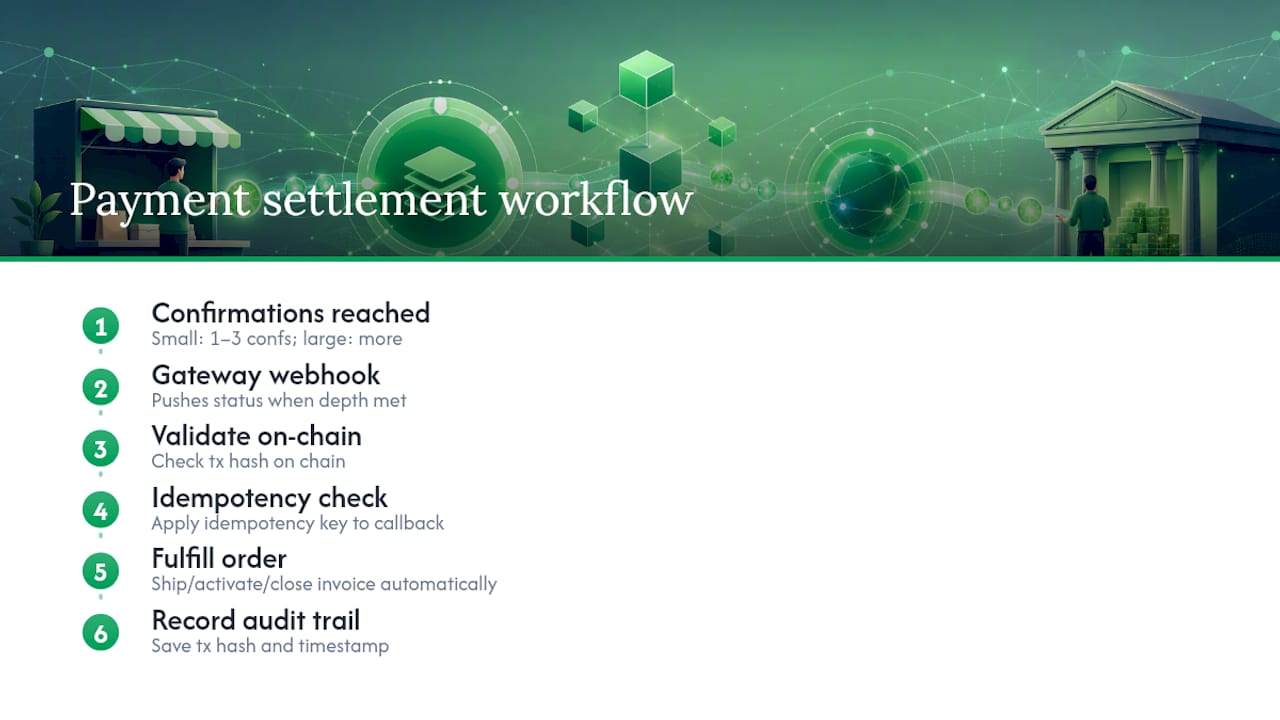
Practitioners generally recommend scaling confirmation requirements to transaction size rather than using one fixed rule. A small retail purchase can reasonably clear at 1 to 3 confirmations, while a large invoice or wholesale order deserves more blocks before you ship or activate service.
Webhooks are what make this practical at scale. Instead of refreshing a block explorer, your gateway pushes a status update the moment a transaction reaches your required depth, and that update should trigger order fulfillment automatically. Validate every webhook payload by checking the transaction hash on-chain and applying an idempotency key, so a duplicate callback never double-credits an order.
Common failure points worth watching for: a customer sends TRX to a TRC-20 USDT address (wrong network), sends a partial amount, or your system receives the same transaction notification twice. Record the transaction hash and timestamp for every payment regardless of outcome. It’s the only reliable paper trail when a customer disputes a charge months later.
Pro Tip:Decide upfront what “paid” actually triggers, whether that’s shipping a product, activating a subscription, or closing an invoice, and write that confirmation rule down before you launch. Ambiguity here is where most support tickets come from.
What Do You Do With TRX After You Receive It?
Every merchant accepting TRON faces the same three-way tradeoff: hold the asset and accept price volatility, convert to a stablecoin and pay a small conversion fee, or route straight to fiat and give up crypto-native speed.
USDT on the TRON network (TRC-20) solves the volatility problem for merchants who don’t want price exposure, while accepting TRX directly suits merchants comfortable holding the asset or converting on their own schedule. Label both options clearly at checkout, something like “USDT (TRC-20) — TRON network,” since vague labeling is a leading cause of customers sending funds on the wrong network.
Practical guidelines for treasury management:
Convert stablecoin balances to fiat on a fixed schedule (daily or weekly) rather than reactively, to simplify accounting.
Hold a small operational TRX balance for day-to-day transactions and route larger reserves to a separate treasury wallet.
Check whether your fiat off-ramp settles same-day or takes several business days, since major processors vary on this.
Testing Checklist Before You Go Live
Run these checks in order before flipping your integration live:
Send test transactions on a sandbox or testnet environment and confirm they appear correctly in your dashboard.
Trigger a test webhook and verify it fires, validates, and updates order status without manual intervention.
Process a test refund end-to-end to confirm the workflow actually works, not just that the button exists.
Confirm invoice matching: does a $50 payment correctly close a $50 invoice, including any minor rounding from network fees?
Check that checkout clearly displays accepted assets and that your receipt email includes the transaction hash.
Brief staff on what to do when a payment arrives on the wrong network or doesn’t arrive at all.
Watch order-completion rate and average confirmation time closely during week one. Both numbers tell you fast whether something in the integration needs adjusting.
How CryptoPayr Handles This for Merchants
CryptoPayr’s TRON payment setup maps directly onto the decision framework above. Storefronts running high order volume get automated checkout, webhooks, and reconciliation out of the box. Merchants who prefer the hybrid model can still route large invoices through a direct wallet while keeping the gateway for everyday sales.
The platform supports over 110 cryptocurrencies, including TRX and USDT (TRC-20), through a no-KYC checkout flow, so merchants skip the onboarding delays that come with traditional processors. Integration options include:
Cart plugins for platforms like OpenCart and Easy Digital Downloads
Hosted payment links and QR codes for invoicing or in-person sales
A full API and webhook system for custom-built storefronts
Treasury tools for auto-converting between TRX, stablecoins, and fiat
What Merchants Get Wrong About TRON Payments
The biggest mistake isn’t technical, it’s organizational: businesses treat operational and treasury funds as one wallet, then panic when a market swing eats into working capital they needed for payroll. Separate wallets fix that in five minutes and cost nothing.
The second mistake is vague checkout labeling. If your checkout just says “crypto accepted” without specifying network, expect support tickets from customers who sent funds to the wrong chain.
Pilot with a small customer segment first, communicate clearly what “TRON” and “TRC-20” mean on your checkout page, and expand once your first week of confirmation data looks clean.
— Dustin
Try CryptoPayr to Accept TRON Payments
CryptoPayr provides a streamlined onboarding process that facilitates accepting TRON payments without delays associated with lengthy verification procedures.
The platform offers plugins for common carts, hosted payment links for invoicing, a full API for custom builds, and treasury tools that can auto-convert between TRX, USDT (TRC-20), and other assets. It supports a large number of cryptocurrencies, including TRON, Bitcoin, and Ethereum. If your platform needs a fully branded checkout experience, a white-label gateway option exists too. Set up your TRON payment gateway today and run your first test transaction before the day is out.
Any TRON-compatible wallet works, including TronLink and hardware wallets that support the TRON network, and gateways like CryptoPayr generate compatible receiving addresses automatically.
Does Coinbase Accept TRON?
Coinbase lists TRX for trading and custody, but merchant-focused settlement to fiat is typically better handled through a dedicated payment gateway built for checkout and invoicing.
How Can I Pay With TRON?
Payers send TRX or TRC-20 USDT to the merchant’s published wallet address or scan a checkout QR code, and the transaction settles once it reaches the required confirmation depth.
Do I Need TRON to Send USDT?
You need TRX only to cover the small network fee for a TRC-20 USDT transfer. The USDT itself is a separate token running on the TRON network.